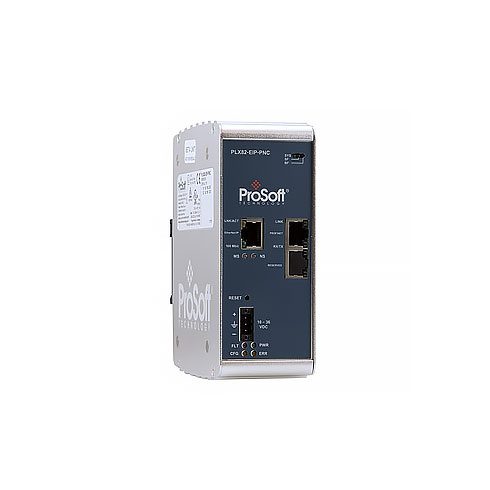

Modbus TCP/IP to IEC 61850 Dual Port Gateway
PLX82-MNET-61850
The Modbus TCP/IP to IEC 61850 gateway enables communication between the Intelligent Electronic Devices (IEDs) on an IEC 61850 network and Programmable Logic Controllers (PLCs) or Programmable Automation Controllers (PACs) on a Modbus TCP/IP network.
The configuration utility software provided with the gateway uses IED configuration files to import complex IEC 61850 data structures. The utility creates Variable files and Function Block files for import into Unity Pro projects for Quantum or M340 processors.
IEC 61850 is the international standard that defines the hardware and communication requirements for all devices within substation automation. The standardized naming conventions imposed by the IEC 61850 standard improves interoperability between systems provided by diverse manufactures or created by multiple system integrators.
- Description
Description
Modbus TCP/IP to IEC 61850 Dual Port Gateway
The Modbus TCP/IP to IEC 61850 gateway enables communication between the Intelligent Electronic Devices (IEDs) on an IEC 61850 network and Programmable Logic Controllers (PLCs) or Programmable Automation Controllers (PACs) on a Modbus TCP/IP network.
The configuration utility software provided with the gateway uses IED configuration files to import complex IEC 61850 data structures. The utility creates Variable files and Function Block files for import into Unity Pro projects for Quantum or M340 processors.
IEC 61850 is the international standard that defines the hardware and communication requirements for all devices within substation automation. The standardized naming conventions imposed by the IEC 61850 standard improves interoperability between systems provided by diverse manufactures or created by multiple system integrators.
Architectures

Features and Benefits
| Configuration Utility Integrates Tightly with Unity Pro |
|
| Configuration Archive and Diagnostics |
|
| Import Configured IED files |
|
| Modbus TCP/IP Client/Server support |
|
Specifications
The gateway is enclosed in a sturdy extruded aluminum case with DIN-rail-mounting.
| Hardware | Two (2) Ethernet ports for Modbus TCP/IP and IEC 61850 communication |
| Software | ProSoft 61850 Configuration Manager for configuration and diagnostic viewing
ProSoft 61850 Tag Monitor for viewing live tag data ProSoft Discovery Service for setting a temporary IP address |
| Configuration Storage | Internally stored, by default. Configuration settings can be saved on an optional removable 1GB Industrial SD Card
ProSoft 61850 Configuration Manager saves configuration information to an offline file. |
Specifications – Modbus TCP/IP
The Modbus TCP/IP driver allows multiple independent, concurrent Ethernet connections. The connections may be Clients, servers, or a combination of both Clients and servers.
Modbus TCP/IP Client
- Actively reads data from and writes data to Modbus TCP/IP devices using MBAP messages on Service Port 502 or Encapsulated Modbus RTU messages on other Service Ports
- Supports up to 10 Client connections with a maximum of 2000 commands to talk to multiple servers
- Modbus Command optimization – Multiple tags can be combined into one Write command with up to 120 words
Modbus TCP/IP Server
- Accepts incoming connections on Service Port 502 from Clients using Modbus TCP/IP MBAP messages and on Service Port 2000 (or other Service Ports) from Clients using Encapsulated Modbus messages.
- Supports up to 20 independent, concurrent server connections for any combination of Service Port 502 MBAP messages and Encapsulated Modbus RTU messages on other Service Points
| Modbus Commands Supported
(Client and server) |
3: Read Holding Registers
16: Preset (Write) Multiple Holding Registers |
| Configurable Parameters (Client and server) | Gateway IP Address
PLC Read Start Register (%MW) PLC Write Start Register (%MW) Number of MBAP and MNET servers Gateway Modbus Read Start Address Gateway Modbus Write Start Address |
| Configurable Parameters (Client Only) | Minimum Command Delay
Response Timeout Retry Count Command Error Pointer |
| Command List | Maximum 2000 Modbus Client commands (one IEC
Data Attribute per command) |
| Status Data | Error codes reported individually for each command
High-level status data available from Modbus TCP/IP Client through MNET server (for example PLC or PAC) |
| Command List Polling | Each command can be individually enabled or disabled; write-only-on-data-change is available |
Specifications – IEC 61850 Client
- Supports up to 45 IEDs
- Send commands from the PLC or PAC to the IED using Control Types
- Direct-with-Normal-Security
- Select Before Operate (SBO)-with-Normal-Security
- Direct-with-Enhanced Security
- Select Before Operate (SBO)-with-Enhanced-Security
| ACSI Basic Conformance | |
| SCSMs supported | SCSM: IEC 61850 8.1(MMS) used |
| ACSI Model Conformance | |
| Reporting | Buffered Report Control Block (BRCB)
Unbuffered Report Control Block (URCB) |
| GOOSE | entryID, DataReflnc |
| Control | Direct-with-Normal-Security
SBO-with-Normal-Security Direct-with-Enhanced-Security SBO-with-Enhanced-Security |
| Logical Nodes | IEC 61850 Logical Nodes, including Logical
Nodes for Hydro Power Plants and Logical Nodes for Wind Power Plants |
| Configurable Parameters | MMS Command Delay |
| Status Data | Status available per node
Report and GOOSE status available High-level status data available from Modbus TCP/IP Client through the MNET server (for example PLC or PAC) |
Specifications – SNTP/NTP Client
The gateway supports a Simple Network Time Protocol (SNTP/NTP) client service that can synchronize the gateway’s time by periodic update requests to a Coordinated Universal Time (UTC) system. The user can configure the SNTP/NTP server details in ProSoft 61850 Configuration Manager. The resolution of the time is in milliseconds (ms).
| Configurable Parameters | SNTP/NTP server synchronization rate (in minutes)
SNTP/NTP server Address |